 Connectivity · Android
Connectivity · Android
Connectivity · Android
An airport doesn't always have wifi with internet access — many operational networks are internal VPNs with no outside access. The app is built to work in both worlds, and critical alarms use two independent paths precisely because of that.
"Having wifi" and "having internet" aren't the same thing. That difference is what determines what can work and what can't.
Office, public terminal or home wifi, with normal access to any internet service.
Private operational network that reaches FlightSort's backend but doesn't reach the internet — common in handling networks.
Carrier 4G/5G coverage. Has internet, but on its own it normally doesn't reach an airport's internal network.
VPN tunnel over mobile data into the airport's network. Reaches the backend; whether there's also internet outside the tunnel depends on how the VPN is configured.
With the app open, only one thing matters: the network needs to reach FlightSort's backend — by whatever path.
If the phone can reach the backend (directly over wifi/data if it's exposed, or via VPN if it's an internal network), the app works in real time: it sees flights, gets instant updates, and can be queried by voice. It doesn't need "internet" in the strict sense — it needs to reach that one specific server.
For a critical alarm to get through even with the app closed or the phone locked, there are two paths that don't depend on each other — precisely because no single path covers every network scenario an airport can have.
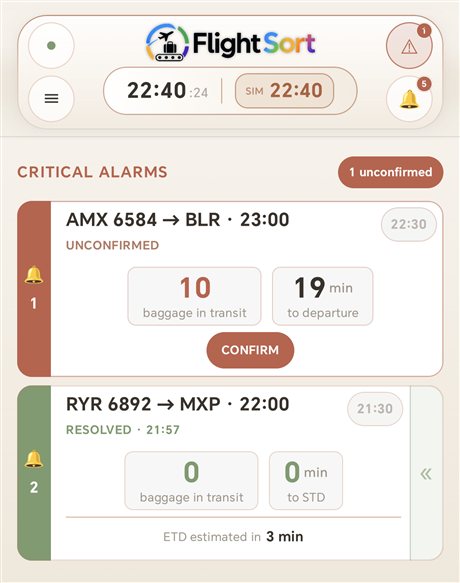
This is what the two paths above look like on screen: an unconfirmed alarm, with baggage still in transit and the countdown to departure, and another already resolved right below it — whichever path it arrived through.
The two paths are complementary, not redundant: each one covers exactly the gap the other leaves.
| Network scenario | Path A · FCM | Path B · Direct | Result |
|---|---|---|---|
| Wifi with internet | ✅ | ✅ | Both active — real redundancy |
| Wifi / internal VPN without internet | ❌ | ✅ | Only the direct path delivers the alarm |
| Mobile data with internet | ✅ | ⚠️ only if the backend is reachable | Usually only path A |
| Mobile data + corporate VPN | ⚠️ depends on the VPN | ✅ | The direct path is what guarantees delivery |
| No coverage of any kind | ❌ | ❌ | No new alarms until connection is restored |
During the diagnostic phase we check which network scenarios apply to your specific installation.