FlightSort
SATE/BHS software · Platform preview

One operational truth, four different screens

FlightSort isn't an app: it's a backend that thinks, and four different ways of looking at it — classic desktop, web, mobile web, and a native Android app. No client recalculates anything on its own; all of them show exactly what the server decides, the moment it happens.

00

The backend API — the system's brain

It has no screen of its own, and it's the most important of the five pieces. This is where each flight's real state gets decided, priorities and alarms get calculated, and everything gets distributed instantly to the four clients.

FlightSort API · SignalR
🖥️
WinForms
REST + push
🌐
Desktop web
REST + push
📱
Mobile web
REST + push
🤖
Android
REST + push

Every client starts with a complete snapshot of operational state and, from there, receives only the changes — the instant they happen, not on the next screen refresh.

Initial snapshot Real-time events Automatic reconnection A single source of truth
01

WinForms — the classic control post

The desktop application built for the operations room: high information density, no distractions, with operational controls at hand.
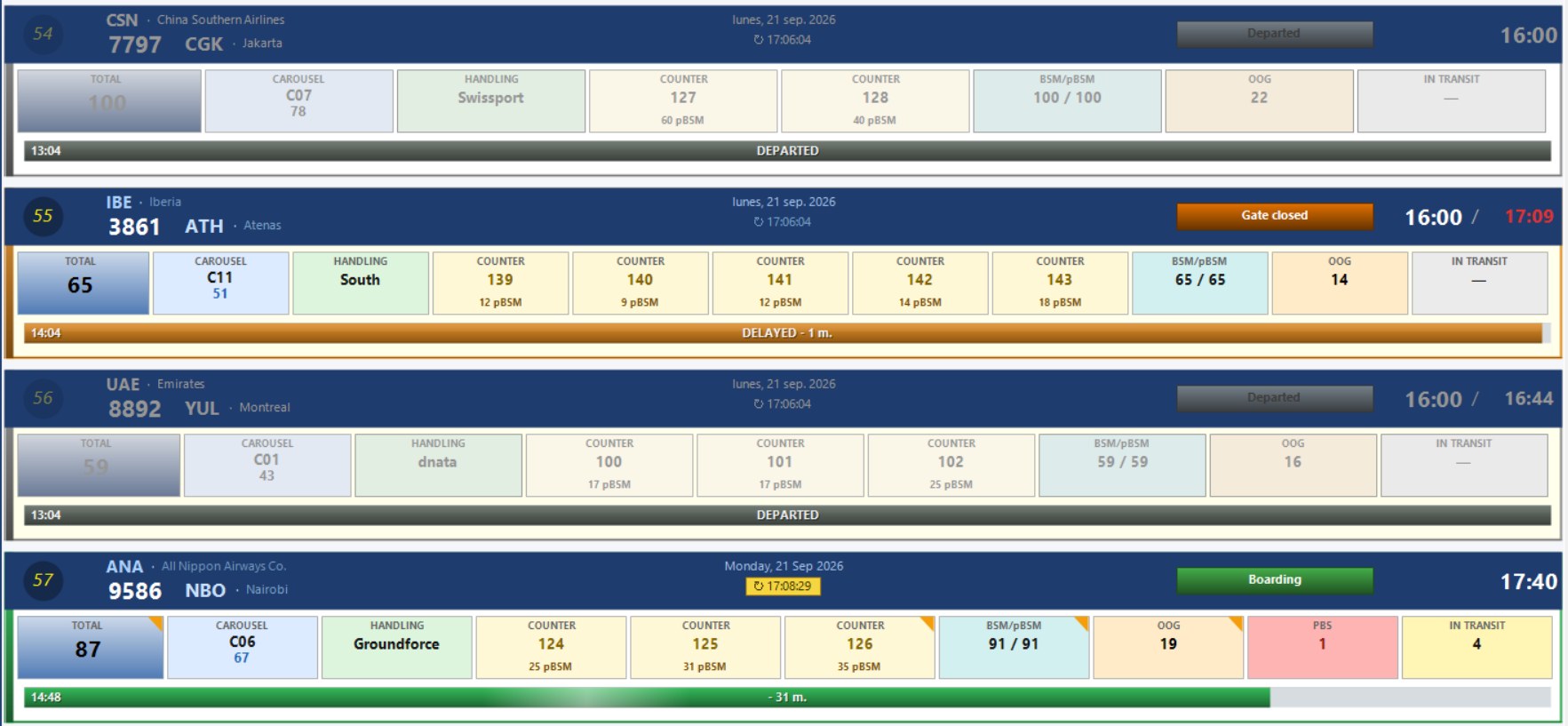
FlightSort — Operations Panel
FlightSort WinForms — classic card

Real capture — WinForms desktop application

Built for the whole shift, not a quick check-in

It's the view an operator leaves open all day, on a dedicated control room screen.

  • BSM / pBSM / baggage-in-transit count per flight, at a glance.
  • Immediate visual alarm when a flight enters its critical window.
  • Quick room actions (NOW, LOAD, COMMS) always within reach.
  • Persistent real-time connection indicator on screen.
  • Full interface in Spanish and English, switchable right from the screen.
02

Web app — the same panel, nothing to install

Built for supervision and management from any browser: counters, handling offices, or a quick check from mobile — no desktop client required.

app.flightsort.net
FlightSort
● Live
EZY8823London LGW · 15:05 Alarm
41BSM
30pBSM
11EC
RYR5094London STN · 14:30 Sorting
82BSM
75pBSM
3EC
VLG1102Barcelona · 14:45 Closed
64BSM
64pBSM
0EC

Desktop: for supervision and management

Username and password access, built for middle management and shift-to-shift coordination.

  • Same real-time data as WinForms and Android, no software to install.
  • Access from any computer in the handling office.
  • Ideal for remote or multi-terminal supervision.
  • Available in Spanish and English, with a language switcher right in the app.
🔒 app.flightsort.net
EZY8823Alarm
41BSM
30pBSM
11EC
RYR5094Sorting
82BSM
75pBSM
3EC
VLG1102Closed
64BSM
64pBSM
0EC

Mobile: the same web, nothing lost

Genuinely responsive design, not a stripped-down version — useful for a quick check from a personal or corporate phone, no app to install.

  • Adapts to any screen size, tablets included.
  • Zero install friction: open it and you're in.
  • Built for a quick check, not for continuous room use.
03

Android app — operations on the move

Built for people on the tarmac or in the handling area, not in front of a monitor: native, voice-enabled, background alarms, and it keeps working even when coverage fails.
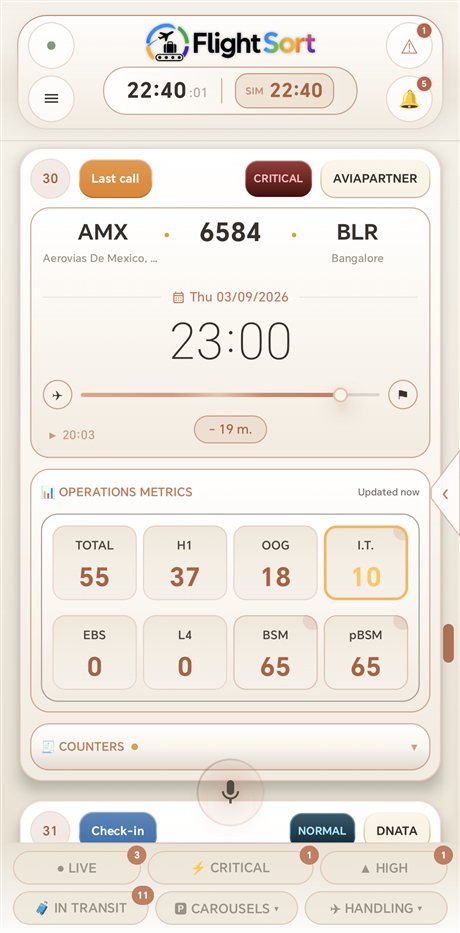
FlightSort Android — main screen, alarms and real-time metrics

Real capture — physical Android device

Designed for the field, not the office

Every detail is built to be used one-handed, with gloves on, under the sun, in the real environment of the tarmac and handling.

  • One-tap filters — LIVE, CRITICAL, HIGH, or baggage in transit only — no digging through dozens of flights.
  • Voice commands to check a flight without touching the screen.
  • Critical alarms even with the app closed or the phone locked.
  • Works from local cache if coverage is momentarily lost.
  • Per-flight trend history: see how a flight has evolved, not just its current state.
  • Spanish and English, selectable from Options or inherited from the phone's language.

Want to see all four screens connected to the same real flight?

We'll show you in a live-data demo, using your own airport's case.

Request a demo